image to 50kb online free compressor
Up to 10 images at once
Your image is uploaded to our server to be compressed. It is not saved: the upload is deleted automatically as soon as your compressed copy is sent back.
| 50kb | 100kb | 200kb | 500kb | 1mb |
Need to compress lots of images, or a whole WordPress site? Try ShortPixel.
We may earn a commission if you buy through this link, at no extra cost to you. Affiliate disclosure.
image to 200kb
Everything is ready. Your form is filled, Your documents are attached. You click that final upload button and your screen stop you cold: “Maximum image size allowed is 50KB.” Just like that, your progress halts completely. Not because your photo is bad, Not because your document are wrong. Simply because your image file is heavy than 50KB.
This specific limit catches people completely off guard. Most are familiar with 200KB or 500KB restriction. But 50KB feels impossibly small especially when your phone camera produces images that are 100 to 200 times larger by default.
The frustration is real. But so is the solution. Savedfast Online Tools compresses your image down to 50KB instantly free, clean, and without destroying your photo quality. No software download, No confusing setting, No technical headaches whatsoever.
Why 50KB Is Such a Tight Limit
To understand why this limit exists, you need to understand what KB actually means. KB stands for kilobytes the unit measuring digital file size. A standard smartphone photo today ranges between 3MB and 10MB. One megabyte equals 1,000 kilobytes. So a 3MB photo is already 60 times larger than a 50KB limit allow.
Portal enforcing 50KB limits typically include highly traffic system competitive exam registration, national scholarship portal, and large scale government recruitment platform. These systems process million of application simultaneously. According to [Google’s web performance research (https://web.dev/fast/#optimize-your-images), reducing image file sizes directly improves server response times and overall system stability under heavy traffic load.
So the 50KB rule protect the entire system not just your submission. Understanding this make the restriction less frustrating and more manageable. The real question is simply how to get your image there without sacrificing quality.
How to Compress Image to 50KB
Four clean simple steps. Completed in well under a second:
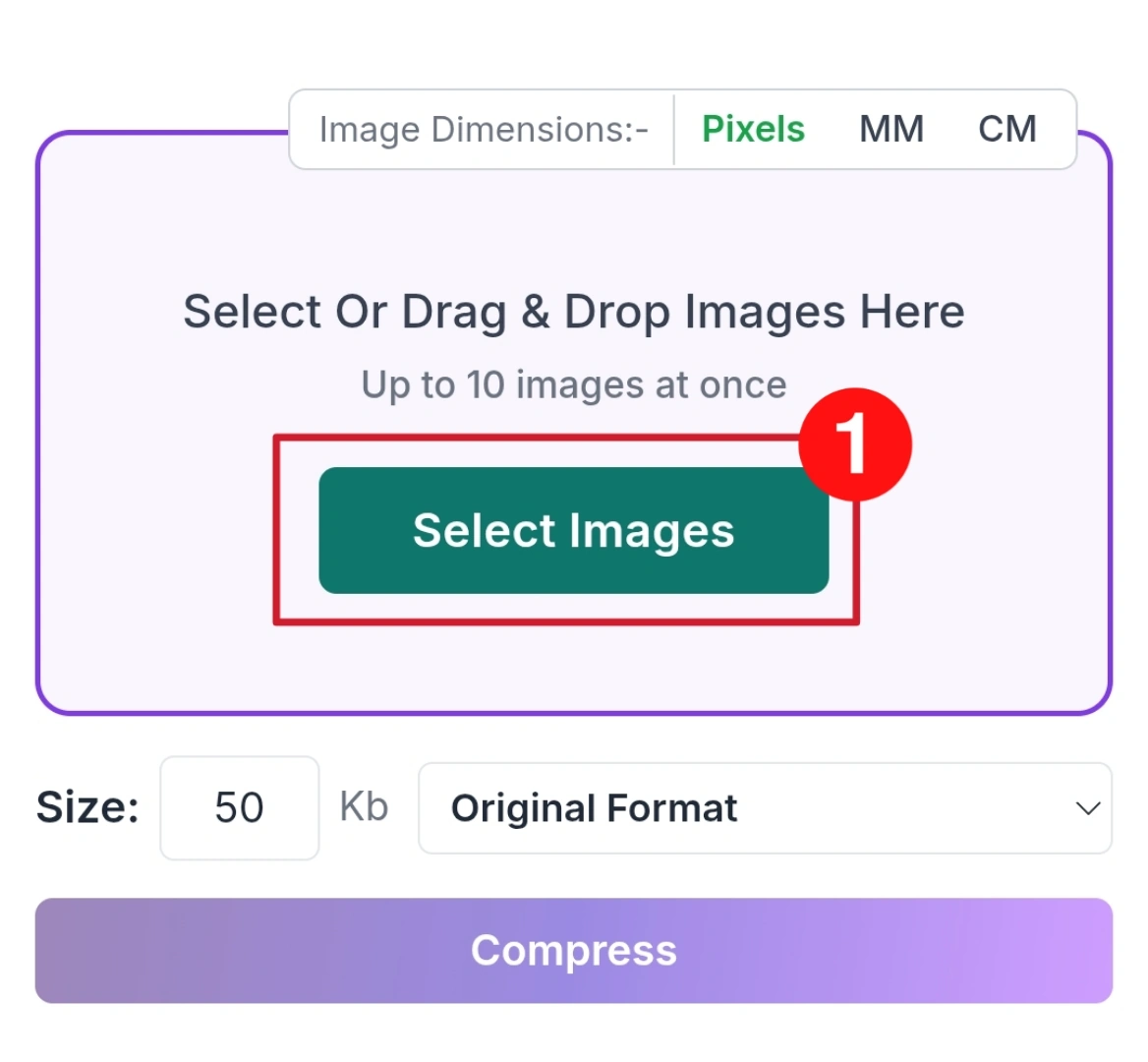
Step 01
Click Select Images button or drag and drop your image into the upload area. You can upload up to ten images at once.
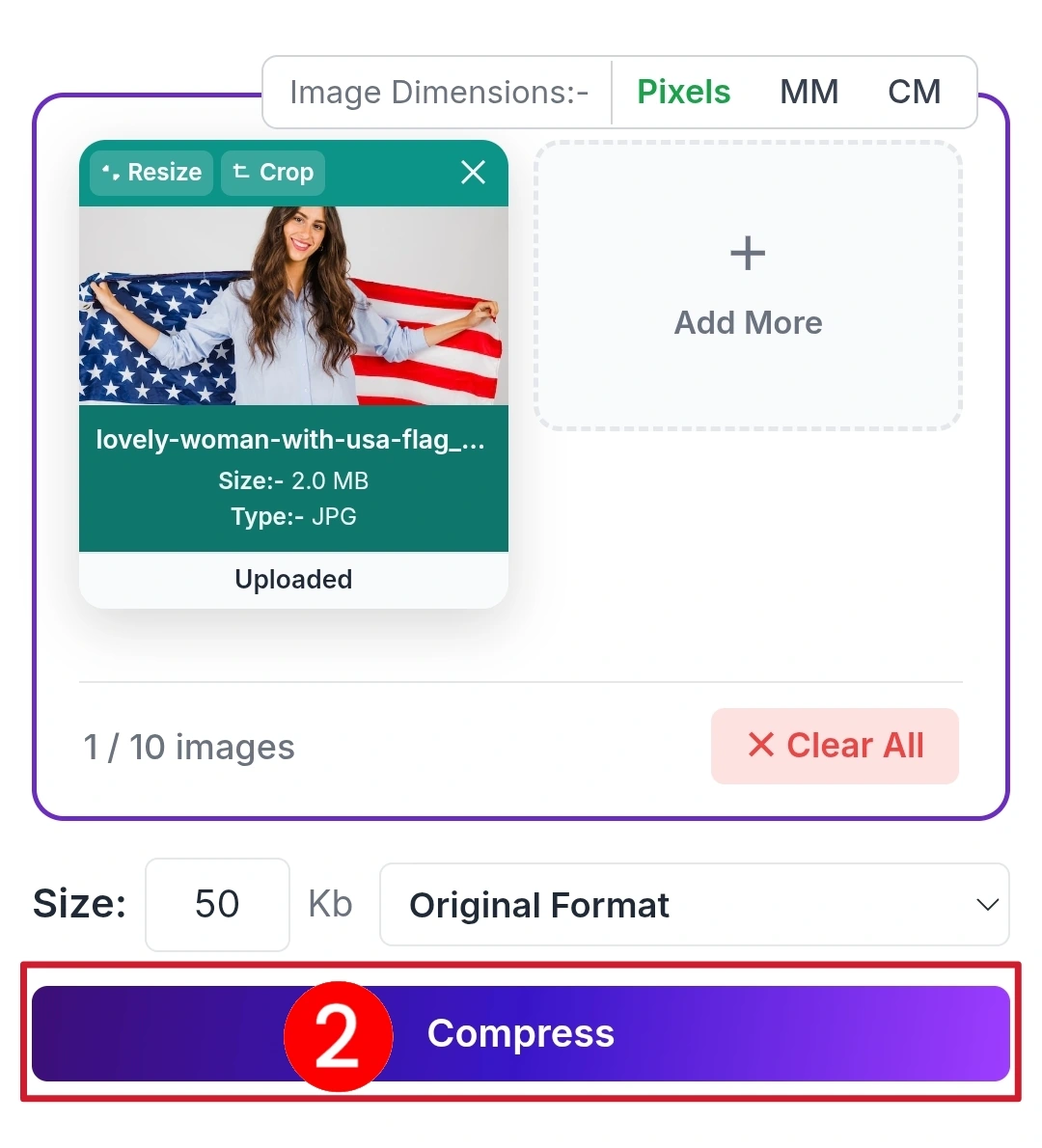
Step 02
Enter your desired size like 50KB, then click the Compress button. The tool will process your image within a few seconds automatically.
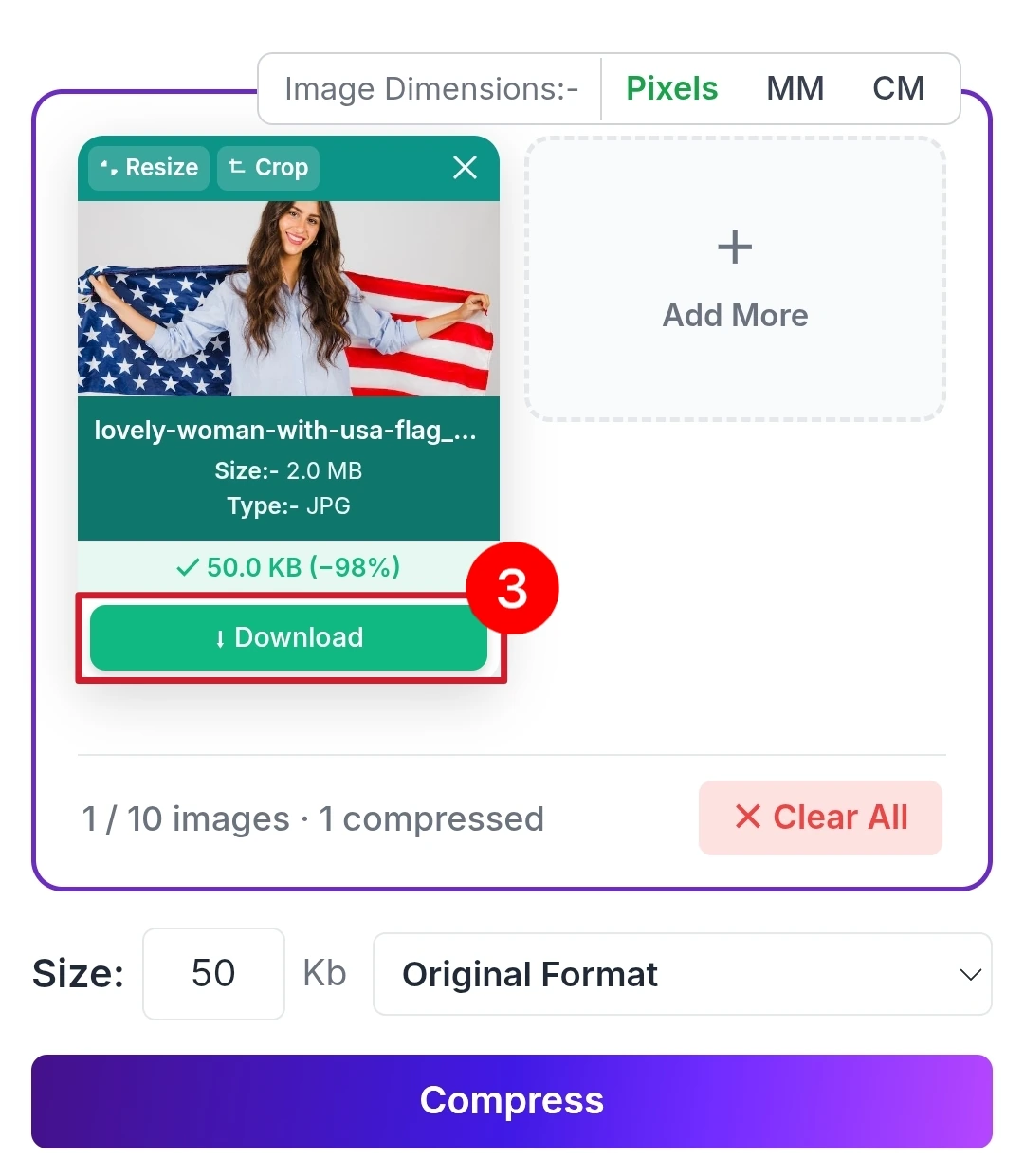
Step 03
After compression, preview the result and click the Download button. Your optimized image is ready for upload anywhere without any issue.
Why Savedfast Handles 50KB Better Than Other Tools
Compressing to 50KB is genuinely harder than compressing to 200KB or 500KB. The margin for error is smaller. Poor compression tools either fail to hit the target or destroy image quality trying to reach it.
Savedfast uses intelligent compression algorithms that work smarter not just harder. Instead of blindly stripping image data, it identifies and remove only the information your eye genuinely cannot detect. The result is a file that meets your 50KB requirement while keeping your photo looking clean and professional.
Feature savedfast
- Completely Free
- No Account Required
- No Daily Cap
- Gets Close to Your Target Size
- Quality Maintained
- Mobile Compatible
No hidden fees appearing after compression, No watermarks ruining your downloaded image, No registration walls blocking your access, No daily limits cutting your session short.
Who Specifically Needs 50KB Compression
Competitive Exam Registrant
National and state level entrance exam commonly enforce 50KB photo limits during online registration. Missing this requirement means your form gets rejected before evaluation even begins. Savedfast prevents that outcome cleanly.
Scholarship Applicant
Government scholarship portal handle enormous application volume. Strict 50KB limits help manage server load. Student who miss this specification lose their submission slot entirely sometime missing critical deadline.
Government Job Candidate
Public sector recruitment portals across many countries enforce tight image restrictions. A 50KB photo requirement is standard on several major government hiring platforms. Savedfast ensures your application clear this hurdle effortlessly.
Passport and ID Applicant
Certain national identification and travel document portal require extremely compact image upload. Savedfast compresses your photo to the size you set while keeping it as clear as possible for official identification purposes.
FAQ
Can an image really look decent at only 50KB?
yes for standard portal uses. Passport photos, profile picture, and basic document image compress cleanly to 50KB using Savedfast smart algorithm. The result looks professional and submission ready.
What image format does Savedfast accept?
JPEG, JPG,webp PNG and more the all famous format requested by virtually every official application portal globally.
Is there a limit on how many image I can compress?
There is no daily cap. You can add up to 10 images at a time, and if you send a lot very quickly the tool pauses for a moment before carrying on.
Does Savedfast store my uploaded images?
No. Your image is uploaded to our server so it can be compressed. It is not saved there: the upload is deleted automatically as soon as your compressed copy is sent back to you. Photo details such as location data (EXIF) are also removed from the compressed copy.
Work on smartphones without an app?
Yes. Open Savedfast in any mobile browser Chrome, Safari, Firefox and compress directly from your phone gallery. No app installation ever required.